A smart DTF gang sheet layout helps you fit more designs on one sheet without making the order hard to cut, sort, or press. Start with your largest artwork first, add medium prints next, then use small logos, sleeve marks, neck labels, names, and repeat graphics to fill safe gaps. The goal is not to pack every inch. The goal is to make every inch usable.
Here is the direct answer. The best DTF gang sheet layout uses final-size artwork, safe spacing, clean grouping, transparent backgrounds, no overlap, and a preview check before ordering. For a visual layout workflow, DTF Gang Roll can help.
How to Plan a Clean and Efficient DTF Gang Sheet Layout
A clean sheet starts before upload. Not after printing. Not when scissors are already in your hand.
DTF gang sheets save space when designs are grouped with purpose. Full-front prints need big blocks. Pocket logos can fill corners. Sleeve marks can sit near narrow gaps. Names and numbers should stay near the order they belong to.
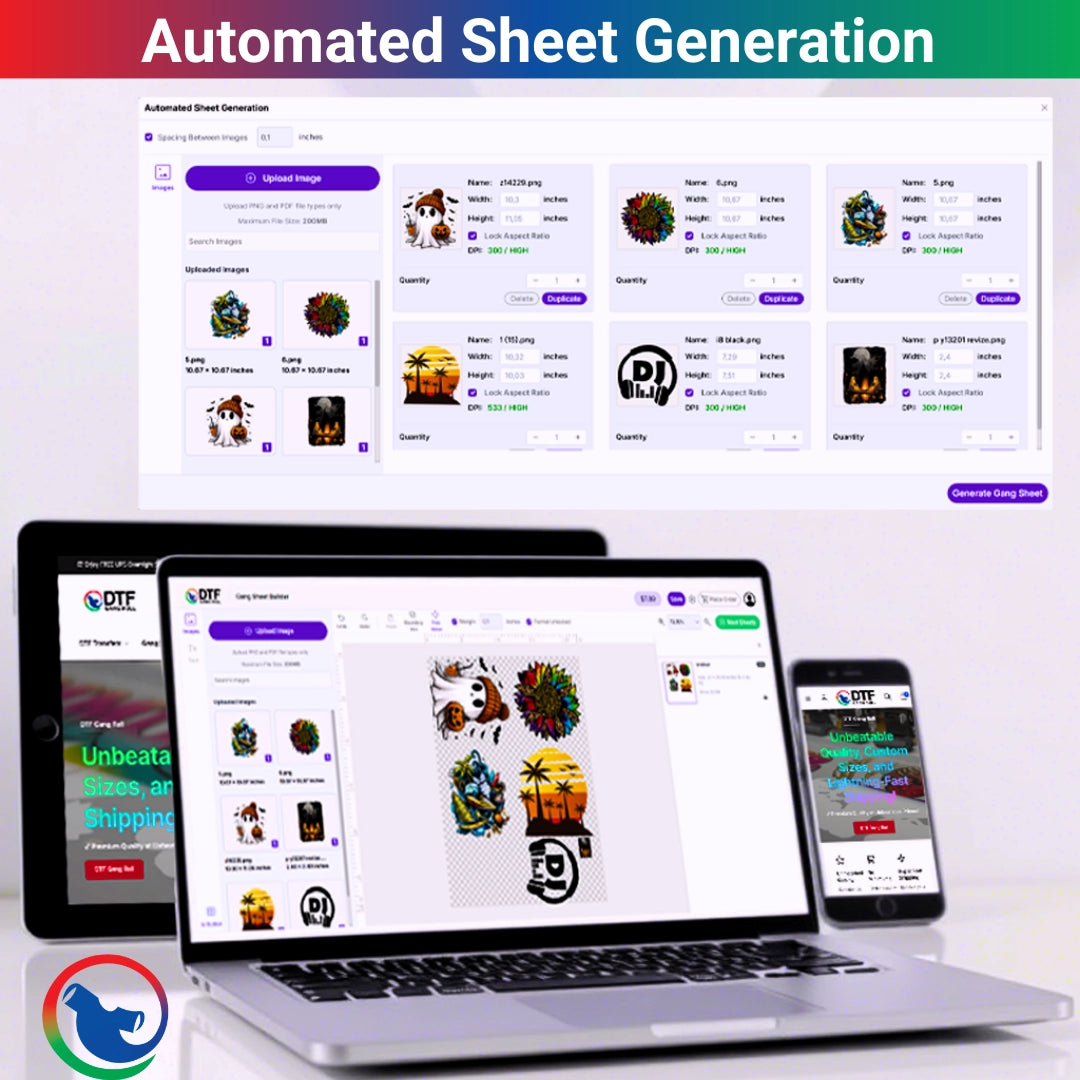
A DTF gang sheet builder helps because you can upload, resize, duplicate, arrange, and preview the layout before checkout. That preview is where small mistakes get caught. Thank goodness.
What Is a DTF Gang Sheet Layout?
A DTF gang sheet layout is the way multiple Direct to Film transfer designs are placed on one sheet.
It can include shirt fronts, back prints, sleeve logos, neck labels, brand marks, names, numbers, and repeat graphics. The layout should match the real production flow, not just look full on screen.
Why Layout Matters
A bad layout wastes space and time.
If designs are too far apart, you pay for empty film. If they are too close, cutting becomes risky. If customer jobs are mixed without order, sorting becomes a mess. That is where the shop starts losing minutes.
What Is a Good Gang Sheet Layout?
A good gang sheet layout fits more transfers while keeping each piece easy to cut and press.
It also keeps related designs together. A gym order should not have sleeve logos scattered across the whole sheet. A school order should not mix youth names into adult back prints without a clear section.
The Simple Rule
Fit more, but do not fight yourself later.
If a layout saves two inches but adds twenty minutes of sorting, it is not really saving anything.
DTF Gang Sheet Spacing Guide
A practical DTF gang sheet spacing guide should protect each design from cutting mistakes.
Leave enough room between transfers for scissors or a rotary cutter. Keep small text away from the edge. Do not overlap artwork. Do not stack designs so tightly that one bad cut ruins two prints.
Spacing Table
|
Layout Area |
Better Practice |
Why It Helps |
|
Between large prints |
Leave clear cut paths |
Prevents nicked edges |
|
Around small logos |
Add breathing room |
Easier sorting |
|
Sheet edges |
Keep key art away |
Protects corners |
|
Names and numbers |
Group by order |
Fewer mix-ups |
|
Sleeve marks |
Place in narrow gaps |
Better space use |
|
Neck labels |
Keep readable |
Cleaner branding |
How to Make a DTF Gang Sheet
How to make a DTF gang sheet starts with final artwork. Not drafts. Not screenshots. Not “use this logo from my phone.”
Set every design at final print size. Confirm copy count. Choose the sheet size. Then build the sheet from large to small.
Simple Build Steps
-
Place full-front and back prints first, add medium graphics, fill safe gaps with small logos, then group related order pieces together.
-
Check spelling, size, transparent backgrounds, spacing, sheet boundaries, artwork direction, and final preview before checkout.
That boring check is where money gets saved.
DTF Gang Sheet Artwork Placement
DTF gang sheet artwork placement should follow how the transfers will be cut and pressed.
Place front designs together. Keep back prints together. Put names near numbers. Keep sleeve logos in one section. If the order has multiple customers, give each customer a clear zone.
Build Like the Press Table
The sheet should act like a map.
When you cut it apart, you should know where every piece goes. No detective work. No “wait, whose logo is this?” panic.
How to Use a DTF Gang Sheet Builder
A gang sheet builder gives you a visual way to arrange designs online.
You can upload artwork, duplicate repeated prints, move pieces, resize designs, and preview the sheet. This helps beginners and busy shops avoid building every layout in design software.
Builder Workflow Tip
Use the DTF gang sheet builder after your sizes are final.
If you keep changing artwork sizes during layout, the sheet becomes harder to control. Decide first. Build second.
Best DTF Gang Sheet Layout for Small Orders
The best DTF gang sheet layout for small orders keeps designs grouped by use.
For example, one boutique drop may include a full-front tee print, a sleeve mark, and a neck label. Put those pieces near each other so cutting and packing feels natural.
Small Order Example
A small order for a Dallas brand might include four shirt fronts, eight sleeve logos, and ten neck labels.
Place the four big designs first. Use the side gaps for sleeve logos. Put neck labels in a neat row. Easy to cut. Easy to count.
Best Layout for Bulk Orders
Bulk sheets need more structure because one mistake can repeat across dozens of garments.
For bulk orders, group designs by customer, garment size, print location, or production stage. That helps with cutting, sorting, pressing, and quality checks.
Bulk Layout Table
|
Order Type |
Layout Method |
Best Use |
|
School shirts |
Group by grade or size |
Names and mascots |
|
Gym apparel |
Group by print location |
Front, sleeve, back |
|
Boutique drop |
Group by design style |
Easy packing |
|
Staff uniforms |
Group by department |
Fewer mix-ups |
|
Event merch |
Group by deadline |
Faster production |
|
Reorders |
Use saved layout |
Repeat speed |
Gang Sheet Space Optimization
Gang sheet space optimization is about using open space without creating cutting stress.
Start with large designs. Then place medium prints. Then fill safe open areas with smaller pieces. Rotate designs only when it makes sense for artwork shape and cutting.
When Empty Space Is Okay
A little blank film can protect the order.
If an extra logo makes the sheet hard to cut, skip it. Saving a tiny strip of film is not worth reprinting a damaged transfer.
Gang Sheet Layout Tips From the Print Table
Good gang sheet layout tips are practical. They are not fancy.
Keep edges clean. Do not crowd small text. Avoid random placement. Leave room for cutting. Match the digital layout to the order sheet. Save the final layout for repeat customers.
One Real-Shop Habit
We like to label layout sections by print location when orders get busy.
Fronts here. Backs there. Sleeves in one row. It looks simple because it is simple. And simple wins on long production days.
File Prep Before Layout
A good DTF gang sheet can still fail if the files are weak.
Use high-resolution PNG files, transparent backgrounds, final print size, no hidden boxes, no stray pixels, and correct artwork direction. Do not mirror unless the supplier asks for it.
File Prep Table
|
File Check |
What to Do |
Why It Matters |
|
Resolution |
Use sharp artwork |
Prevents blur |
|
Background |
Use transparent PNG |
Avoids boxes |
|
Size |
Set final inches |
Prevents wrong scaling |
|
Spacing |
Leave cut room |
Protects transfers |
|
Copy count |
Count repeats |
Avoids shortages |
|
Preview |
Review the sheet |
Catches mistakes |
Local Layout Examples for USA Sellers
In Arlington and across Dallas-Fort Worth, sheet layout matters for real jobs: UTA club tees, Downtown Arlington pop-up drops, Parks Mall boutique apparel, Globe Life Field weekend merch, Texas Live event shirts, Grand Prairie teams, Mansfield school orders, Fort Worth uniforms, and Dallas brand launches.
A school order may need youth fronts, adult backs, sponsor logos, and sleeve marks. A local brand may need front prints plus neck labels. A clean layout keeps those jobs from turning into a pile of film and stress.
Artwork Rights and Proof Approval
Before printing, make sure you have permission to use the artwork.
Use artwork you own, licensed files, or customer-approved designs. Be careful with school marks, sports logos, brand names, cartoons, mascots, and protected slogans.
Why Proofs Help
A proof should show the sheet layout, design sizes, quantities, placement notes, and spelling.
“Looks good” is nice. A measured proof is better when money is on the line.
A Print Table Quote
“Good gang sheet layout is not about cramming. It is about clean space that prints, cuts, and presses without drama.”
That is the whole mood. A packed sheet that slows production is not a win.
FAQ
What is a DTF gang sheet?
A DTF gang sheet is a single Direct-to-Film transfer sheet that holds multiple designs, logos, names, labels, or graphics in a single print-ready layout.
What is a DTF gang sheet layout?
A DTF gang sheet layout is the way multiple transfer designs are arranged on one sheet for printing, cutting, sorting, and heat pressing.
What is the best gang sheet layout?
The best gang sheet layout places large designs first, fills safe gaps with smaller prints, groups related artwork, and leaves enough spacing for clean cutting.
How does a DTF gang sheet builder help?
A DTF gang sheet builder helps by letting you upload artwork, resize designs, duplicate copies, arrange the layout, and preview the sheet before ordering.
What is a good DTF gang sheet spacing guide?
A good DTF gang sheet spacing guide leaves clear cut paths between designs, keeps small text away from edges, avoids overlap, and protects each transfer from cutting damage.
How do I handle DTF gang sheet artwork placement?
Handle DTF gang sheet artwork placement by grouping designs by order, print location, size, or production stage so cutting, sorting, and pressing stay organized.
Final Thoughts on Gang Sheet Layout
A strong DTF gang sheet layout saves space without making the job harder.
Place big designs first. Fill safe gaps. Keep related prints together. Leave cutting room. Check the preview. Save the layout for reorders.
That is how DTF gang sheets turn from a crowded print file into a clean production tool.