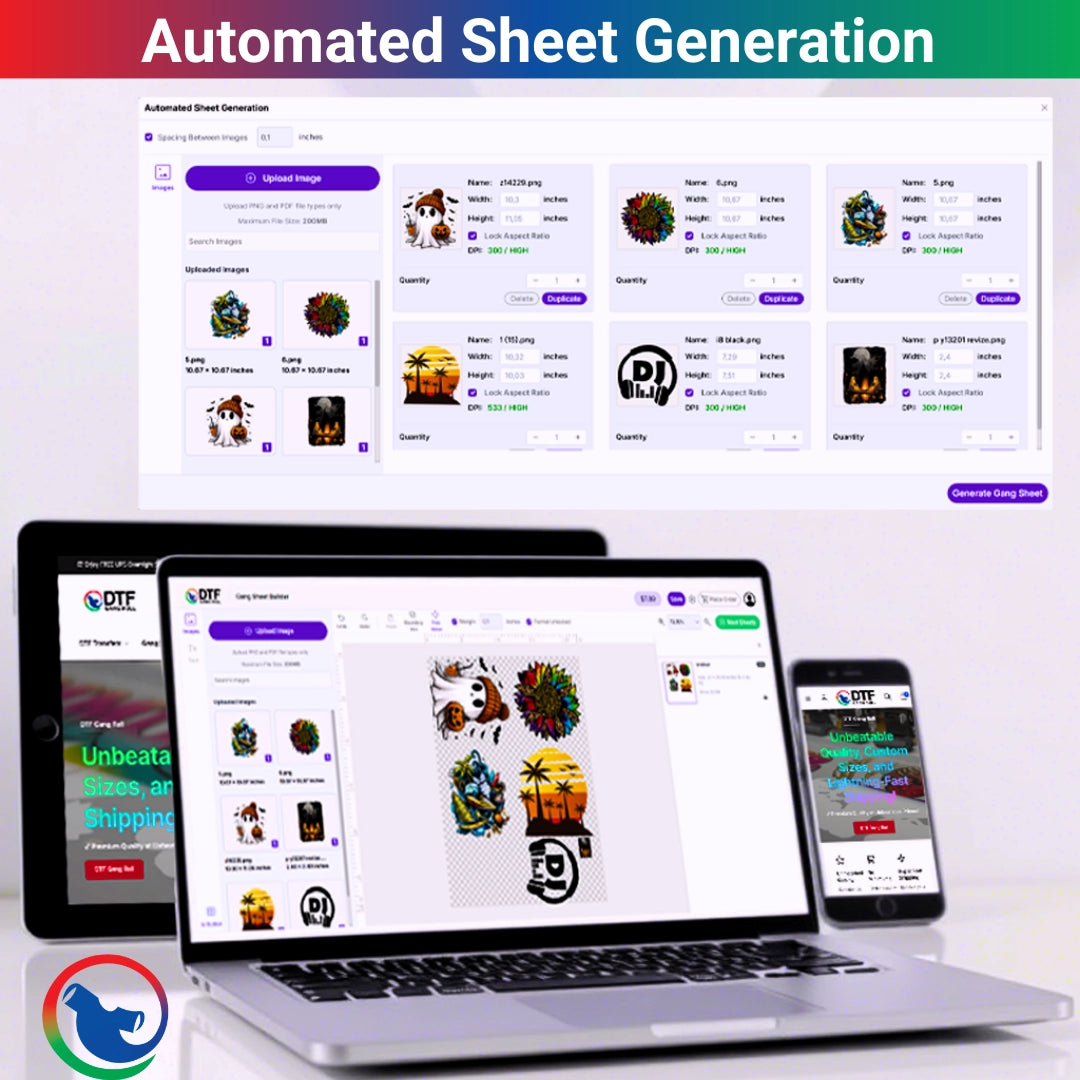
A DTF gang sheet can be built two ways: with an online builder or with a manual layout in design software. A builder is faster for most small businesses because you can upload art, resize designs, duplicate copies, arrange the sheet, and preview everything before ordering. Manual layout gives more control, but it also takes more skill, more time, and more room for file mistakes.
Here is the direct answer. Use a gang sheet builder when you need a simple, visual way to make DTF gang sheets without design software. Use manual layout when you already know print sizing, artboards, margins, export settings, and file prep. For easy online layout and ready-to-print ordering, DTF Gang Roll can help.
DTF gang sheet builder
Most people do not need a complicated setup. They need transfers that print clean, cut clean, and press clean.
A DTF gang sheet builder is best for fast orders, repeat logos, simple resizing, bulk copies, and small businesses that want fewer file headaches.
Manual layout is better for trained designers, print shops with strict file systems, and complex sheets that need exact placement across many sizes.
What Is a DTF Gang Sheet?
A Direct to Film gang sheet is one larger sheet that holds multiple transfer designs. You can group full-front prints, left chest logos, sleeve marks, names, numbers, neck labels, and repeat graphics in one place.
The goal is simple: use the sheet space well and make production easier.
Why Layout Matters
A bad layout wastes money. It can also make cutting harder.
If designs are too close, you may nick the artwork. If files are blurry, they print blurry. If sizing is wrong, the whole order feels off. Oof.
What Does a Gang Sheet Builder Do?
A gang sheet builder gives you a browser-based layout tool. You upload artwork, move it around, resize it, rotate it, duplicate it, and preview the sheet.
That helps when you do not want to build the full layout in Illustrator, Photoshop, Canva, or another design program.
Why Builders Feel Easier
You can see the sheet as you build it. That is the win.
Instead of guessing if six chest logos fit next to one back print, you can test the layout on screen before ordering.
What Is Manual Layout?
Manual layout means you build the full sheet yourself in design software. You create the artboard size, place every graphic, check spacing, export the final file, and upload it as a print-ready layout.
It gives more control, but it also expects more knowledge.
Where Manual Layout Helps
Manual layout can work well when a shop has trained staff, brand templates, exact repeat jobs, or complex sheets with many customer groups.
It is slower for beginners. No shame there. Production software can feel like driving a forklift in a hallway.
Builder vs Manual Layout: Quick Comparison
Both methods can work. The better choice depends on your skill, order size, deadline, and file needs.
|
Feature |
Gang Sheet Builder |
Manual Layout |
|
Skill level |
Easier for beginners |
Better for trained users |
|
Setup speed |
Faster for simple sheets |
Slower at first |
|
Size control |
Visual resizing |
Exact software control |
|
Error risk |
Lower for basic layouts |
Depends on file skill |
|
Best use |
Simple and repeat orders |
Complex production sheets |
|
Preview |
Built into workflow |
Depends on software |
When Should You Use a DTF Gang Sheet Builder?
Use a DTF gang sheet builder when you need fast layout without deep design setup.
It works well for shirt sellers, boutiques, schools, gyms, churches, event vendors, and local brands that need transfers grouped on one sheet.
Good Builder Orders
A builder is useful for logos, simple shirt designs, name drops, sleeve prints, neck labels, team numbers, and repeat customer graphics.
If you can upload the art, size it, and place it cleanly, the builder can save time.
When Is Manual Layout Better?
Manual layout is better when the sheet is complex, the artwork needs detailed edits, or the file must follow a strict production template.
It can also help if you are building many sheets for one large job and need perfect alignment across files.
Manual Layout Needs Skill
You need to understand artboard size, transparent backgrounds, image resolution, margins, export type, and final print size.
Miss one setting, and the sheet may not print as expected. That is where the pain starts.
How to Make a DTF Gang Sheet
How to make a DTF gang sheet starts with final artwork. Not half-finished art. Not screenshots. Final files.
Confirm each design size. Then choose the sheet size, place large designs first, fill open space with smaller graphics, and leave cutting room.
Simple Build Order
- Gather final PNG artwork, confirm every print size, pick the sheet size, place large designs first, add smaller logos, then duplicate repeat prints.
-
Check spacing, spelling, background, copy count, sheet boundaries, and export or preview before placing the order.
Slow here. Faster later.
How to Build a Gang Sheet in a Builder
How to build a gang sheet in a builder is more visual. Upload your designs, drag them onto the sheet, resize, duplicate, rotate if needed, then preview the final layout.
This works well when you want speed plus fewer file setup steps.
Watch the Preview
The preview is your last safety check. Use it.
Look for designs touching each other, hidden white boxes, missing copies, wrong size, fuzzy artwork, or anything outside the printable area.
Gang Sheet Layout Tips for Both Methods
Good gang sheet layout tips apply whether you use a builder or manual software.
Place big designs first. Put related designs together. Keep rows clean. Leave enough space to cut. Use small logos to fill safe gaps.
Cut Like a Human
The sheet is not finished when it prints. You still have to cut it.
If your layout needs surgeon-level cutting, it is too tight. Give your scissors room to breathe.
How to Maximize Gang Sheet Space Without Making a Mess
To maximize gang sheet space, think in layers of size.
Large back prints go first. Medium chest graphics go next. Tiny sleeve marks, labels, and logos fill the open corners.
Empty Space Is Not Always Bad
A little blank film can save a design.
If packing one more logo makes the whole sheet harder to cut, skip it. Saving pennies while risking dollars is not smart.
Gang Sheet File Requirements
Strong gang sheet file requirements protect the print quality.
Use high-resolution artwork, correct print size, transparent backgrounds, safe spacing, no overlap, and final review. The file should match the sheet size, and the layout should be print-ready.
File Setup Table
|
Requirement |
Why It Matters |
Builder or Manual |
|
Transparent PNG |
Avoids unwanted boxes |
Both |
|
300 DPI when possible |
Keeps artwork sharp |
Both |
|
Correct print size |
Prevents wrong scaling |
Both |
|
Safe margins |
Protects sheet edges |
Both |
|
No overlap |
Keeps designs separate |
Both |
|
Preview check |
Catches mistakes |
Both |
Custom Gang Sheet vs Custom DTF Gang Sheet
A custom gang sheet can refer to any grouped sheet layout. A custom DTF gang sheet is made for Direct to Film heat transfer printing.
For apparel sellers, that means the sheet should be designed around garment placement, press size, cutting, and repeat use.
Think Beyond the Screen
A design may look fine on a layout screen. But how will it cut? How will it press? How will it sort by customer?
That is the production mindset.
Ready to Press Gang Sheets
Ready to press gang sheets are helpful when you want the print work done before the garment job starts.
They arrive printed, so you can cut the designs apart and press them onto shirts, hoodies, totes, or other compatible apparel.
Who Benefits Most?
Small businesses benefit when they do not want to manage a printer, ink, powder, curing, maintenance, and wasted test prints.
You still need a good heat press, clean garments, and correct pressing habits. But the print production part is handled.
Gang Sheet Printing for Local and Online Sellers
Gang sheet printing supports both local and online apparel work.
In Arlington and across Dallas-Fort Worth, sellers use sheets for UTA clubs, Downtown Arlington events, Parks Mall boutiques, Globe Life Field weekends, Texas Live crowds, Grand Prairie teams, Mansfield schools, Fort Worth shops, and Dallas brands.
Why Local Orders Need Clean Layouts
Local orders can move fast. A teacher needs shirts by Friday. A gym wants staff tees before an event. A vendor needs a weekend drop.
A clean sheet can keep the whole job from turning into chaos.
Which Method Saves More Time?
For most simple orders, the builder saves time. You avoid setting up artboards and export settings.
For complex or repeat production, manual layout can be faster once templates are built.
The Real Answer
Use the method that creates fewer mistakes for your workflow.
Fast is nice. Correct is better.
A Print Table Quote
“A gang sheet is not just a file. It is the map your press table follows.”
That is why layout matters. Bad maps waste time.
FAQ
What is a DTF gang sheet?
A DTF gang sheet is one larger Direct to Film transfer sheet that holds multiple designs, logos, names, numbers, or graphics in one print-ready layout.
Are DTF gang sheets better with a builder or manual layout?
DTF gang sheets are better with a builder for simple, fast, visual layouts, while manual layout is better for trained users who need exact file control.
What does a gang sheet builder do?
A gang sheet builder lets you upload artwork, resize designs, duplicate copies, arrange the layout, and preview the sheet before ordering.
How do I use a DTF gang sheet builder?
Use a DTF gang sheet builder by uploading artwork, setting each design size, placing large designs first, filling gaps with small designs, and checking the preview.
What are the main gang sheet file requirements?
The main gang sheet file requirements are high-resolution artwork, a transparent background, the correct print size, safe spacing, no overlap, and a final preview check.
How do I maximize gang sheet space?
Maximize gang sheet space by placing large designs first, fitting medium prints next, using small logos in open gaps, and leaving enough room to cut each transfer.
Final Thoughts on Builder vs Manual Layout
A DTF gang sheet can be built well in a builder or by hand.
The builder wins for speed, simplicity, and fewer beginner mistakes. Manual layout wins when you need more file control and already know the setup.
Either way, clean artwork, correct sizing, safe spacing, and a full preview matter most.