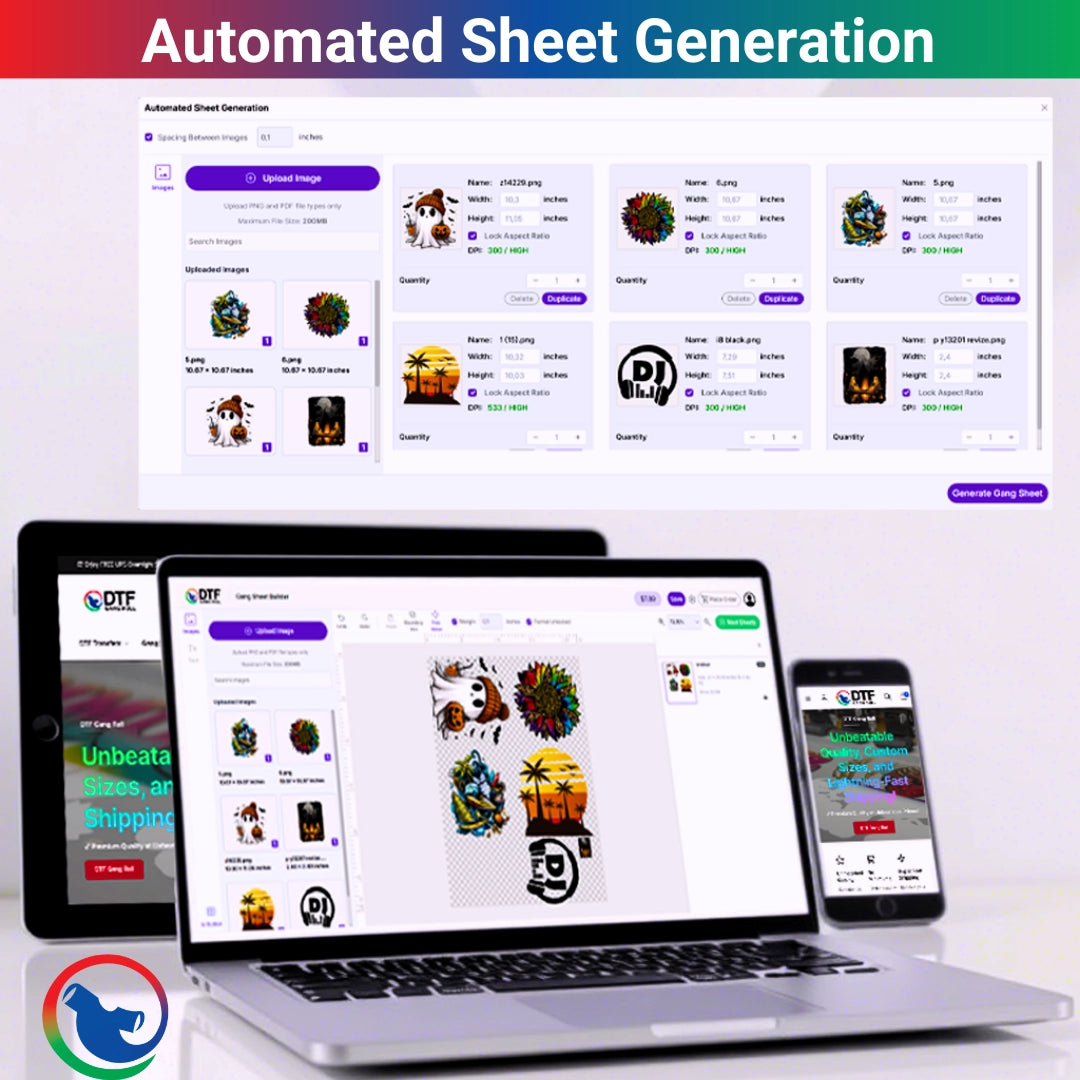
A DTF gang sheet works best when your artwork is high resolution, correctly sized, spaced with enough cutting room, placed inside the sheet boundary, and uploaded in a clean file format. The best setup is usually transparent artwork, final print size, sharp edges, no blurry screenshots, and a layout that leaves small gaps between each design.
Here is the direct answer. For the Best file setup for DTF gang sheets, use clean PNG files, size every design before upload, keep artwork at print size, leave safe spacing, avoid overlapping graphics, and check the full sheet before checkout. For custom gang sheet printing and online layout help.
DTF Gang Sheet File Setup
A good gang sheet saves space. A bad gang sheet wastes film, time, and sometimes the whole order.
Your DTF gang sheet file setup should answer five questions before you upload: Is the file sharp? Is the size correct? Is the background transparent? Is the spacing safe? Is everything inside the sheet boundary?
A DTF gang sheet layout is not just about packing designs close together. It is about making a sheet that prints clean, cuts clean, and presses without drama.
What Is a DTF Gang Sheet?
A Direct to Film gang sheet is one larger transfer sheet that holds multiple designs. You can place logos, names, full-front graphics, sleeve prints, labels, pocket prints, and repeat artwork on one sheet.
That is why print shops, schools, gyms, boutiques, churches, and local brands use gang sheets. One sheet can carry a whole order.
Why File Setup Matters
The printer prints what you send. If the artwork is blurry, the print will be blurry. If the layout overlaps, the overlap may print. If the design is too close to another design, cutting gets annoying fast.
We have seen tiny spacing mistakes turn into a full sheet of “well... that is not fun.”
What File Type Should You Use?
For most DTF work, transparent PNG files are a common choice because they hold clean edges and do not bring in a random white box behind the artwork.
Vector files can be useful during design, but your final upload should match the platform instructions. If the builder asks for PNG, send PNG.
Avoid Screenshots
Screenshots are usually low quality. They may look fine on your phone, then print soft, jagged, or fuzzy.
Use the real artwork file. Not the screenshot from a text thread. Please. Future you deserves better.
What Image Resolution Is Best?
DTF image resolution should be high enough to print sharp at the final size. A common target for print files is 300 dots per inch when possible.
Do not take a tiny 2-inch logo and stretch it to 12 inches. It may upload, but it will not magically gain detail.
How to Check Resolution
Zoom in before ordering. Look at the edges. If the design looks pixelated on screen at print size, it will likely print that way too.
A crisp file has clean edges. A bad file looks like stairs around the letters.
DTF Artwork Size: Set It Before Upload
DTF artwork size should match the size you want on the garment. Do not guess after upload if the order matters.
A left chest logo may be 3 to 4 inches wide. A full-front shirt graphic may be around 10 to 12 inches wide. A youth print may need a smaller size than an adult print.
Size by Placement
|
Placement |
Common Size Range |
File Tip |
|
Left chest |
3 to 4 inches wide |
Keep text readable |
|
Full front |
10 to 12 inches wide |
Check image sharpness |
|
Youth front |
7 to 9 inches wide |
Do not oversize |
|
Sleeve logo |
2 to 3.5 inches wide |
Use simple detail |
|
Neck label |
2 to 3 inches wide |
Avoid tiny text |
|
Back print |
10 to 13 inches wide |
Confirm garment size |
Gang Sheet File Dimensions
Gang sheet file dimensions depend on the sheet size you choose. Many DTF gang sheets are built on a fixed width, then the length changes based on the order.
DTF Gang Roll’s upload page lists custom gang sheet options up to 22 inches by 300 inches, which gives room for small batches and large print runs.
Stay Inside the Sheet Boundary
Keep all artwork inside the boundary. If the builder warns that images are outside the sheet, move them back in.
Anything outside the print area can get cut off. And yes, it is usually the part you needed most.
Gang Sheet Spacing
Gang sheet spacing is the space between each design. You need enough room to cut transfers apart without slicing into the art.
Do not pack designs edge to edge. The sheet may look efficient, but cutting becomes a little nightmare.
Practical Spacing Tip
Leave enough room for scissors or a cutter to move between designs. For tiny labels, give yourself even more control.
Saving a sliver of film is not worth ruining ten small logos.
How to Create a DTF Gang Sheet
How to create a DTF gang sheet starts with a list. Know every design, size, quantity, and placement before you start laying out the sheet.
Place large designs first. Then fill the gaps with smaller logos, sleeve prints, tags, and repeat designs.
Simple Setup Steps
-
Gather final artwork, remove unwanted backgrounds, confirm print sizes, check resolution, choose the sheet size, and place large graphics first.
-
Fill open space with smaller prints, leave cutting room, check for overlap, review spelling, then preview the full sheet before placing the order.
This is the part where slow work saves money.
How to Build a DTF Gang Sheet in a Builder
How to build a DTF gang sheet in an online builder is pretty simple. Upload your designs, resize each one, arrange them on the sheet, duplicate copies when needed, and preview before checkout.
A builder helps because you can see the sheet before it prints. You can move designs, adjust size, and use more of the sheet.
Watch for Builder Warnings
If the builder says designs overlap, fix it. If it says artwork is outside the boundary, fix it.
Those warnings are not decorations. They are there to save your order.
DTF Graphics Setup for Clean Printing
DTF graphics setup should be clean, bold, and realistic for the final print size. Thin lines, tiny letters, small textures, and low contrast can cause trouble.
Use readable text. Keep edges smooth. Remove stray pixels. Make sure transparent areas are actually transparent.
Check the Background
Open the file on a dark background and a light background. This helps catch hidden white boxes, stray marks, and rough cutout edges.
A hidden white square is one of those mistakes that makes everyone stare at the press table in silence.
DTF File Size Guide
A DTF file size guide should balance quality and upload limits. Large files can preserve detail, but oversized files can slow uploads or fail.
The DTF Gang Roll builder page shows PNG upload support and a maximum file size of 100 MB in the builder interface.
Keep Files Clean
Flatten unnecessary layers before exporting. Remove unused art. Export only what needs to print.
Clean files upload faster and reduce confusion.
Upload Artwork for DTF Without Mistakes
When you upload artwork for DTF, treat it like sending a file to production, not just sharing a picture.
Check spelling, size, color, edges, background, duplicates, and orientation. Once the order prints, a typo is not a typo anymore. It is inventory.
One-Minute Preflight
Before checkout, zoom in, check every design, count copies, check sheet size, review placement, and make sure nothing overlaps.
A one-minute check can save a full reprint. That is a good trade.
Best Layout Strategy for Bulk Orders
Bulk orders need order. Random layouts create sorting problems later.
Group designs by customer, garment, print location, or order number. Keep repeat logos together. Keep names near the matching design when possible.
Label Your Files
Use file names like “Smith Plumbing Left Chest 3.5in” or “UTA Club Back Print 11in.”
That sounds basic. It is. It also saves your brain during busy weeks.
Local Use for Arlington and USA Sellers
In Arlington and across the Dallas-Fort Worth area, gang sheets help sellers move fast for schools, teams, gyms, boutiques, churches, markets, and event apparel.
A vendor near Downtown Arlington may need tees for a weekend pop-up. A group near UTA may need club shirts. A business near Parks Mall may need staff logos. A team in Grand Prairie, Mansfield, Fort Worth, or Dallas may need names, numbers, and sponsor prints.
The cleaner the file setup, the smoother the order.
Common DTF Gang Sheet Mistakes
Most mistakes are preventable. Not all. But most.
The big ones are blurry files, wrong print size, no transparent background, artwork outside the sheet, designs touching each other, hidden white boxes, and tiny text that cannot print well.
Quick Mistake Table
|
Mistake |
What Happens |
Better Setup |
|
Low-resolution logo |
Prints fuzzy |
Use sharp art |
|
Wrong size |
Print is too big or small |
Set final inches |
|
No spacing |
Hard to cut |
Leave safe gaps |
|
Hidden background |
White box prints |
Use transparent PNG |
|
Overlap |
Designs merge |
Move art apart |
|
Tiny text |
Hard to read |
Enlarge or simplify |
A Print Table Quote
“Your gang sheet should look boring before it prints: clean files, safe spacing, correct sizes. The shirt can be exciting later.”
That is the truth. Good production files are calm. Chaos belongs nowhere near the upload button.
FAQ
What is the best DTF gang sheet file setup?
The best DTF gang sheet file setup uses high-resolution artwork, transparent backgrounds, final print sizing, safe spacing, and a layout that keeps every design inside the sheet boundary.
What is the Best file setup for DTF gang sheets?
The best file setup for DTF gang sheets is a clean PNG layout with correct artwork size, strong image resolution, no hidden background, no overlap, and enough cutting room between designs.
What DTF image resolution should I use?
Use high-resolution artwork at the final print size. A 300 DPI file is a common print target when possible, but the design must also look sharp at the actual size you want printed.
How much gang sheet spacing do I need?
Leave enough spacing to cut between designs without touching the artwork. Small designs, names, and labels often need extra cutting room.
How do I upload artwork for DTF correctly?
Upload clean artwork in the accepted file type, confirm the final print size, check for transparent backgrounds, review the full sheet preview, and fix any overlap or boundary warnings.
What is the easiest way for how to build a DTF gang sheet?
The easiest way to build a DTF gang sheet is to use an online builder, upload each design, resize it, place large prints first, fill gaps with small designs, and preview before ordering.
Final Thoughts on DTF Gang Sheet File Setup
A clean DTF gang sheet starts before printing.
Use sharp artwork. Set the size. Leave space. Check the sheet boundary. Preview the full layout. Fix errors before ordering.
It is not glamorous work, but it is the work that saves money, blanks, and late-night frustration.